
NEWS
QR Code Email Scam Turns Employee Reviews Into a Login Trap

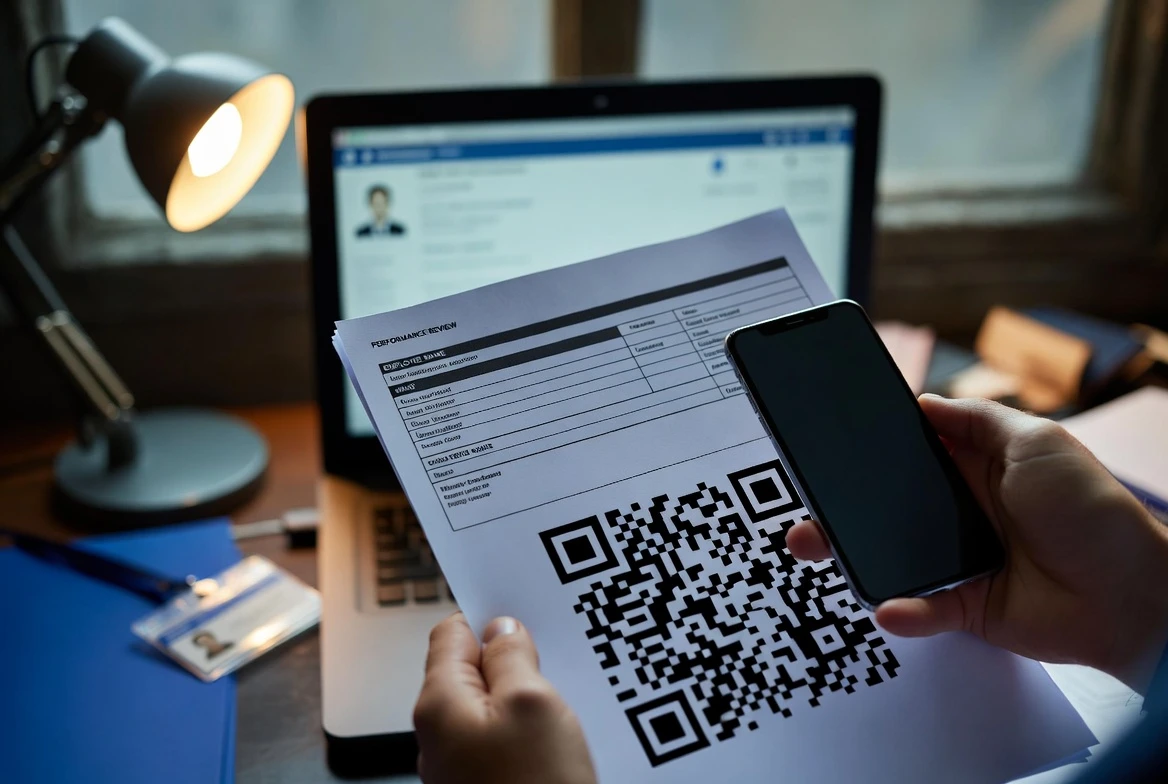
A QR code email scam targeting employee reviews turns a routine HR task into a phone-first credential trap. The fake notice promises appraisal access, pay updates and benefits information, then pushes a worker to scan a Quick Response code (QR, a scannable pattern that opens a link or action) instead of logging into a known HR portal. The safe response is simple: do not scan; open the HR system through a saved bookmark or ask HR through a known channel.
The example email used a May 15, 2026 deadline, a copied logo from Microsoft, the software company, a generic ‘Dear Techtips’ greeting and an unrelated sender domain. Those details matter because they all point to the same endgame: steal the worker’s login before payroll, benefits or review data can be checked through a trusted path.
The Phone Move Gives the Scam Away
Most employees have learned to hover over links, check sender domains and distrust attachments. A QR code removes that familiar pause. The message asks the employee to leave the work computer, open a phone camera and trust a link that is hidden until after the scan.
That move is especially suspicious in human resources. A real review or compensation notice normally routes a worker through Workday, a human resources software provider, ADP, a payroll and HR services company, or another named single sign-on portal. In the sample message, QR-only access is the break in process.
| Signal | Normal HR Review Workflow | Suspicious QR Review Email |
|---|---|---|
| Sender identity | Company domain or known HR system | Display name masks an unrelated domain |
| Access route | Saved HR portal, app or single sign-on page | Phone camera scans a hidden destination |
| Personalization | Full employee name and internal details | Generic greeting or mailing-list label |
| Verification | Known login page with company controls | Unknown mobile page after the scan |
| Safe response | Open the portal yourself | Ignore the code and report the message |
The scam works because it copies the surface of office life. Performance reviews have deadlines. Pay updates feel sensitive. Benefits documents are private. A fraudster does not need the whole HR system to look convincing; one familiar logo and one urgent date may be enough to make a busy employee move too fast.
HR Lures Work Because They Borrow Routine Anxiety
Microsoft Threat Intelligence, the company’s security research group, said in Microsoft’s Q1 email threat report that QR code phishing volume rose from 7.6 million attacks in January to 18.7 million in March, a 146% increase during the quarter. The company also said PDF attachments were the dominant delivery method for these attacks, reaching 70% of QR code attacks in March.
- 7.6 million to 18.7 million: Microsoft’s reported jump in QR code phishing attacks from January to March.
- 70%: The share of QR code phishing attacks delivered by PDF attachment in March, according to Microsoft.
- 191,561: Phishing and spoofing complaints counted by the FBI Internet Crime Complaint Center (IC3, the FBI’s online cybercrime reporting portal) in the FBI’s 2025 Internet Crime Report.
- $3.05 billion: Reported losses tied to Business Email Compromise (BEC, fraudulent email schemes that trick businesses or staff into payments or data exposure) in the same FBI report.
Those numbers do not prove that this single fake HR notice hit one company at scale. They show why a performance review lure has a ready-made audience. Every employee understands the stakes, and every employee knows ignoring HR can create trouble.
QR Codes Hide the Link From the Inbox
A QR code turns a URL into a picture. That picture can sit in an email body, a PDF or a document that looks harmless during a fast inbox scan. The trick is low-friction: the employee supplies the phone, the camera and the trust.
Image Instead of Text
Traditional filters can inspect links in message text and rewrite them through a security service. A QR image gives those tools less obvious material to inspect unless the security product extracts and analyzes the embedded URL. Attackers add corporate colors, official-looking headers and minimal text because the page after the scan does the real work.
Phone Browser Instead of Managed Computer
The phone shift matters. A managed laptop may run Endpoint Detection and Response (EDR, software that monitors managed computers), browser controls and company DNS filtering. A personal phone may not. The employee may also see less of the destination URL on a small screen, especially when the page opens inside a camera preview or mobile browser.
Redirects Instead of a Single Destination
The FBI’s quishing alert on malicious QR codes, released on January 8, 2026, described attacks that force victims to move from a corporate endpoint to a mobile device and can route them through attacker-controlled redirectors. The same alert said those pages can collect device and identity details such as user agent, operating system, IP address and locale before showing a mobile-optimized fake login page.
That is the business risk behind a fake review notice. If the worker enters credentials on the phone, the attacker may not stop at the appraisal file. Email, Teams, cloud storage and internal contacts can become the next target.
Six Checks Before Anyone Scans
The Federal Trade Commission (FTC, the U.S. consumer protection agency) warns in the FTC’s QR code scam guidance that scammers can send QR codes by email or text and invent a reason for people to scan. An HR review notice is a strong reason because it feels private and time-sensitive.
Before scanning any code tied to pay, benefits, tax forms, reviews or disciplinary notices, check the message like an investigator, not like a calendar reminder.
- Full sender address: the visible name can say HR while the domain belongs to a contractor, a compromised small business or a random website.
- Named platform: a real notice should point to a known HR portal, not a vague secure access system.
- Greeting quality: generic labels such as ‘Dear Techtips’ suggest a bulk message or placeholder, not an employee-specific review notice.
- Deadline pressure: a high-importance flag and a near deadline are emotional triggers, not proof of authenticity.
- QR-only path: sensitive files should remain inside the company login flow, not behind a camera scan.
- URL preview: if the phone shows a shortened link, misspelled domain or unfamiliar host, close it before the page loads.
None of those checks requires advanced security knowledge. The habit is the protection. Slow the message down until the sender, system and destination can all be verified outside the email.
Defenses That Do Not Depend on Perfect Employees
Employees should not carry the whole burden. The Cybersecurity and Infrastructure Security Agency (CISA, the U.S. cyber defense agency) and its partners treat phishing as an attack cycle that organizations can break early in CISA’s phishing prevention guidance. For HR-themed QR attacks, that means changing the workflow before the next fake review lands.
Companies can make the safe path easier than the scam path. A policy that says HR will never require QR-only access for payroll, benefits or performance files gives employees a clear rule. It also gives security teams a clean message to send after a suspicious email is reported.
- Ban QR-only HR notices for sensitive data and state that rule in onboarding and annual review communications.
- Route review files through single sign-on (SSO, one company login that opens approved work apps) and named HR platforms.
- Give employees one reporting button or mailbox for suspicious HR messages, then acknowledge reports quickly.
- Train HR and help desk staff to verify review questions through known phone numbers or internal chat, not by replying to the suspicious email.
- After one report, search mailboxes for similar subjects, sender domains, QR images and PDF attachments, then purge confirmed phish.
For higher-risk groups, phishing-resistant multi-factor authentication (MFA, a second proof of identity after a password) should be paired with device checks and conditional access. Training helps, but a tired worker on review week should not be the last line of defense.
The Safe Route Back to the Review File
MFA still matters, but weaker login flows can be abused after a worker follows the wrong instruction. In the FBI’s Kali365 phishing alert, IC3 warned on May 21, 2026 that the Phishing-as-a-Service (PhaaS, subscription phishing tools sold to criminals) kit could capture Open Authorization tokens (OAuth, a token-based way for apps to access accounts without a password) and gain persistent access to Microsoft 365 accounts. The alert said the attack can involve a real Microsoft verification page and a device code, which makes the moment feel legitimate to the victim.
That warning fits the HR scam pattern even when the mechanics differ. A message that asks the employee to trust a code, a login prompt or an unfamiliar verification flow is asking for authority it has not earned. If a review file is real, it will still be there when the employee opens the portal directly.
For an employee review, use your own path: a saved HR bookmark, the company app, a known help desk number or a direct message to HR through an internal channel.

-
 TECH1 year ago
Where Garmin Watches are Made and How They are Assembled
-

 AUTO3 months ago
Tesla’s Roadster Is ‘a Few Weeks Away,’ Says Its Chief Designer
-
 NEWS10 years ago
Samsung Releases Galaxy Note7 TV Ad as Reddit AMA Leaks Specs
-
 NEWS10 years ago
Android 7.0 Nougat Rolls Out To Nexus Devices With New Emoji, Features
-
 FINANCE9 years ago
Cardano Price Surges as ADA Enters the Crypto Top Ten List
-
 NEWS10 years ago
Pre-Order the First Camera Made for Facebook Live Streaming Video
-
 FINANCE1 year ago
Binance Suspends Trading and Withdrawals for a System Upgrade
-
 FINANCE9 years ago
RChain Price Jumps Nearly 150% to a New All-Time High of $2.03